Simon Online

2021-05-03

Query BigTable Events

Firebase can feed its data to bigtable and then you can run queries there. The syntax is SQL like but not quite because they have internal record types. So for the data that is fed across from firebase you get a structure that looks like
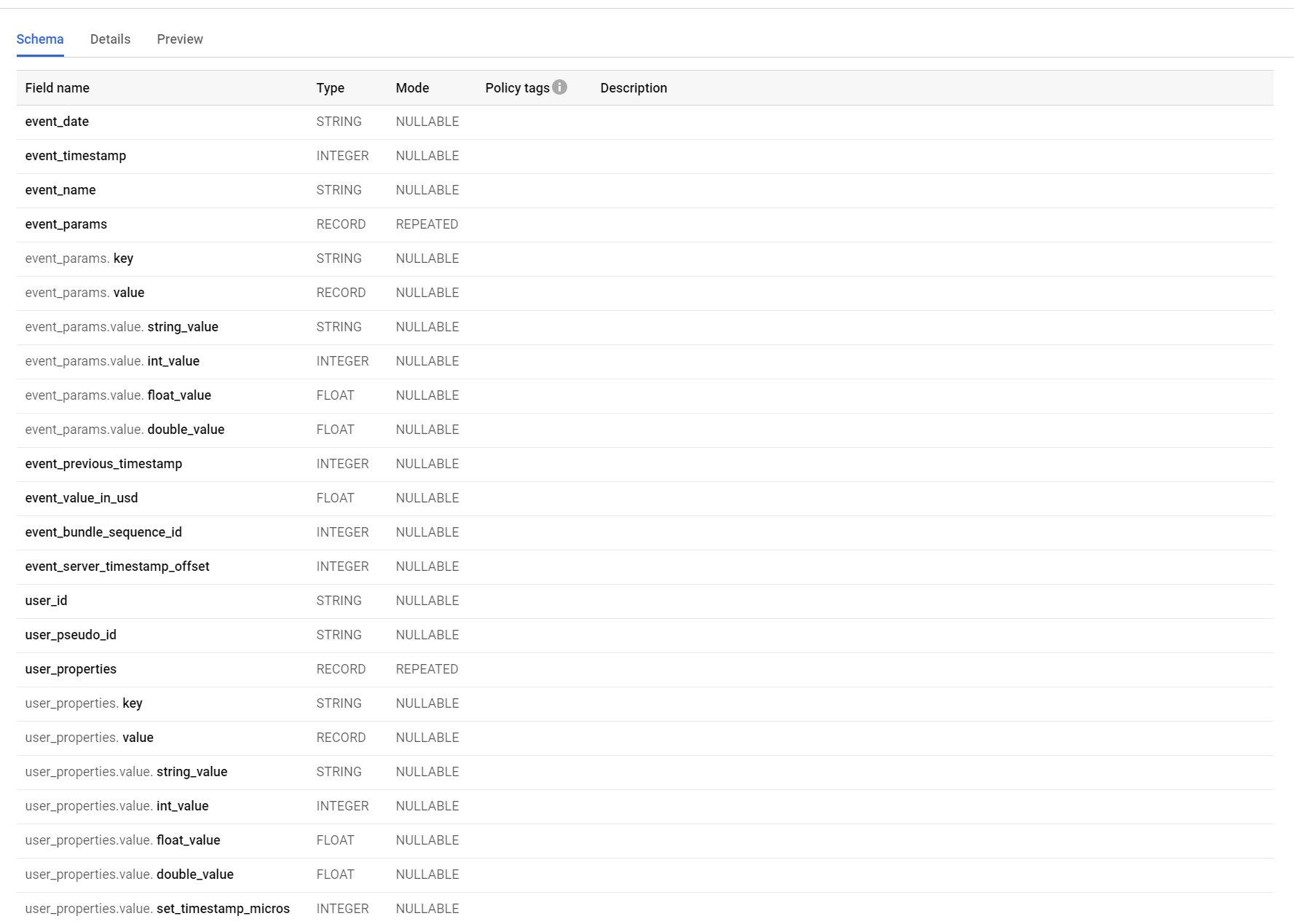
You can see that event_params and user_properties are these kind of collection things. The easiest way to deal with them is to flatten the structure and internally join the table against itself

SELECT r.event_name, p.key, p.value FROM `pocketgeek-auto.analytics_258213689.events_intraday_20210305` r cross join unnest(r.event_params) as p where key = 'DealerName'

This gets you a dataset like
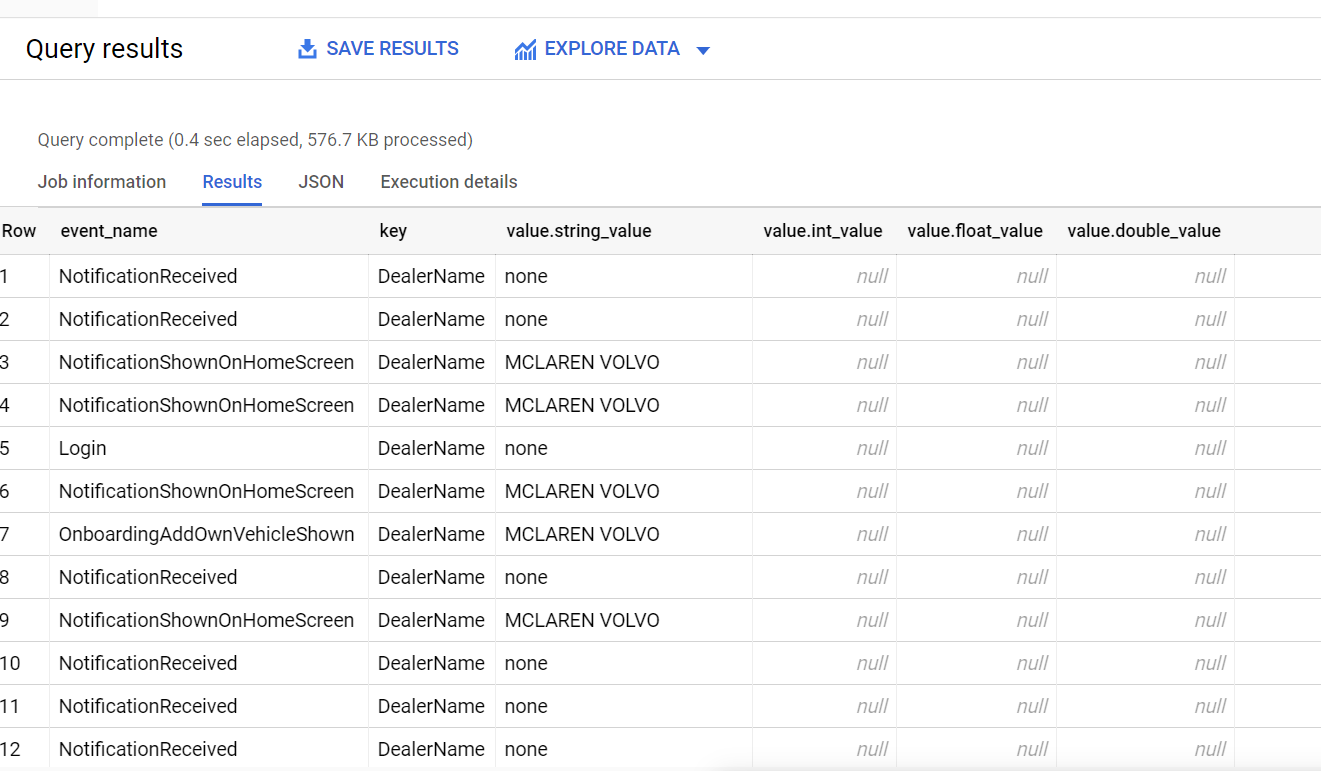
SELECT r.event_name, p.key, p.value FROM `pocketgeek-auto.analytics_258213689.events_intraday_20210305` r cross join unnest(r.event_params) as p where key = 'DealerName' and p.value.string_value <> 'none'

is probably even better with the filter
2021-05-02

Taking Notes

Taking notes is hard. I think I took notes in university but I wasn’t very good at it. I’d either put everything in them making them unapproachably long or I’d put in too little information. As a result I’ve kind of shied away from taking notes in my professional career. Unfortunately, is it starting to bite me more and more as I jump around between technologies and projects. I often find myself saying “shoot, I just did this 6 months ago - how do I do that?”

Read More

2021-05-02

Logging in Functions

Looks like by default functions log at the info level. To change the level you can use set the application setting AzureFunctionsJobHost__logging__LogLevel__Default to some other value like Error or Info.

If you want to disable adaptive sampling then that can be done in the host.json

{
  "version": "2.0",
  "extensions": {
    "queues": {
      "maxPollingInterval": "00:00:05"
    }
  },
  "logging": {
    "logLevel": {
      "default": "Information"
    },
    "applicationInsights": {
      "samplingSettings": {
        "isEnabled": false
      }
    }
  },
  "functionTimeout": "00:10:00"
}

In this example adaptive sampling is turned off so you get every log message.

A thing to note is that if you crank down logging to Error you won’t see the invocations at all in the portal but they’re still running.

2021-05-02

Increase Terminal Buffer in VS Code

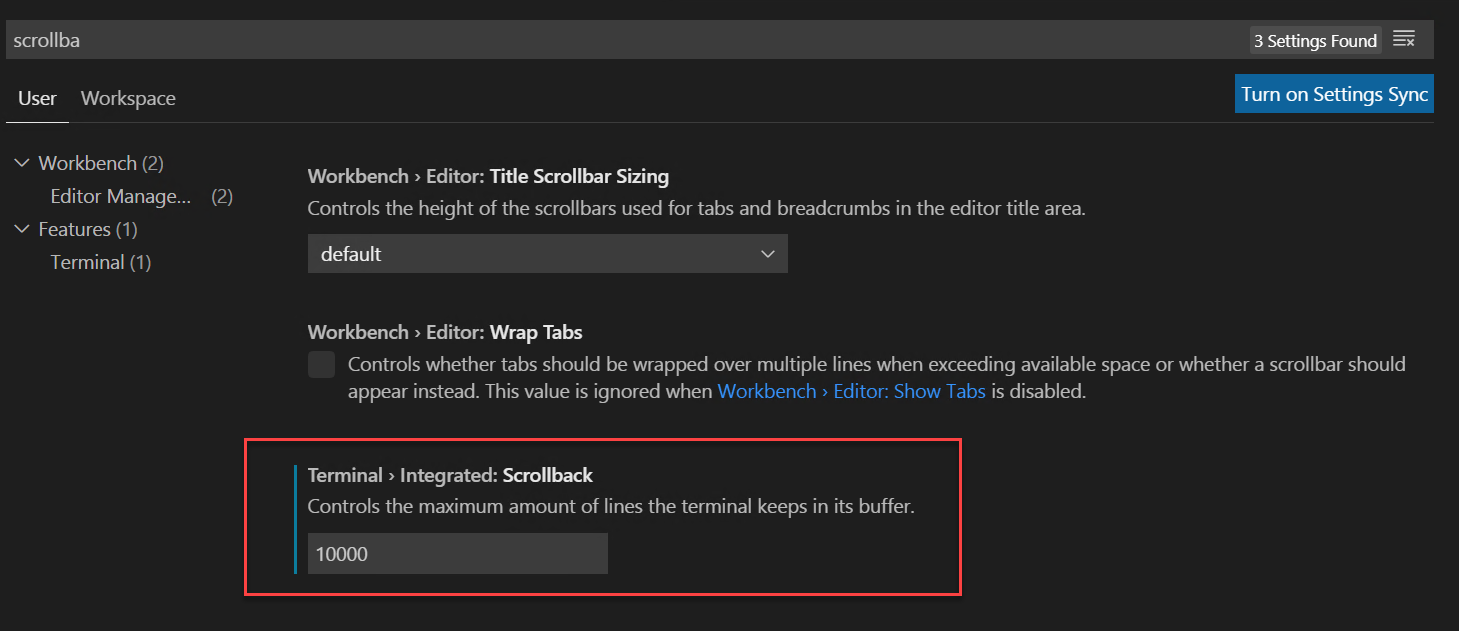
Got something in your terminal which is producing more output than you can scroll back through (I’m looking at you terraform plan)? You can adjust the setting in preferences:

2020-12-31

Sensitivity classification and bulk load

This problem has caught me twice now and both times it cost me hours of painful debugging to track down. I have some data that I bulk load into a database on a regular basis, about 100 executions an hour. It has been working flawlessly but then I got a warning from SQL Azure that some of my columns didn’t have a sensitivity classification on them. I believe this feature is designed to annotate columns as containing financial or personal information.

The docs don’t mention much about what annotating a column as being sensitive actually does except require some special permissions to access the data. However once we applied the sensitivity classification the bulk loading against the database stopped working and it stopped working with only the error “Internal connection error”. That error lead me down all sorts of paths that weren’t correct. The problem even happened on my local dev box where the account attached to SQL server had permission to do anything and everything. Once the sensitivity classification was removed everything worked perfectly again.

Unfortunately I was caught by this thing twice hence the blog post so that next time I google this I’ll find my own article.

2020-12-03

Running DbUp commands against master

I ran into a little situation today where I needed to deploy a database change that created a new user on our database. We deploy all our changes using the fantastic tool DbUp so I figured the solution would be pretty easy, something like this:

use master;
create login billyzane with password='%XerTE#%^REFGK&*^reg5t';

However when I executed this script DbUp reported that it was unable to write to the SchemaVersions table. This is a special table in which DbUp keeps track of the change scripts it has applied. Of course it was unable to write to that table because it was back in the non-master database. My databases have different names in different environments (dev, prod,…) so I couldn’t just add another use at the end to switch back to the original database because I didn’t know what it was called.

Fortunately, I already have the database name in a variable used for substitution against the script in DbUp. The code for this looks like

var dbName = connectionString.Split(';').Where(x => x.StartsWith("Database") || x.StartsWith("Initial Catalog")).Single().Split('=').Last();
var upgrader =
    DeployChanges.To
        .SqlDatabase(connectionString)
        .WithScriptsEmbeddedInAssembly(Assembly.GetExecutingAssembly(), s =>
          ShouldUseScript(s, baseline, sampleData))
        .LogToConsole()
        .WithExecutionTimeout(TimeSpan.FromMinutes(5))
        .WithVariable("DbName", dbName)
        .Build();

var result = upgrader.PerformUpgrade();

So using that I was able to change my script to

use master;
create login billyzane with password='%XerTE#%^REFGK&*^reg5t';
use $DbName$;

Which ran perfectly. Thanks, DbUp!

2020-11-20

Updating SMS factor phone number in Okta

Hello, and welcome to post number 2 today about the Okta API! In the previous post we got into resending the SMS to the same phone number already in the factor. However people sometimes change their phone number and you have to update it for them. To do this you’ll want to reverify their phone number. Unfortunately, you will get an error from Okta that an existing factor of that type exists if you simply try to enroll a new SMS factor.

You actually need to follow a 3 step process

  1. Find the existing factors
  2. Remove the existing SMS factor
  3. Re-enroll the factor being user to specify updatePhone

Read More

2020-11-20

Resending an SMS verification code in Okta from nodejs

The title of this blog seems like a really long one but I suppose that’s fine because it does address a very specific problem I had. I had a need to resend an SMS to somebody running through an Okta account creation in our mobile application. We use a nodejs (I know, I’m not happy about it either) backend on lambda (and the hits keep coming). We don’t take people through the external, browser based login because we wanted the operation to be seamless inside the app.

The verification screen looks a little this (in dark mode)

okta-resend-sms-nodejs

Read More

2020-11-18

Allocating a Serverless Database in SQL Azure

I’m pretty big on the SQL Azure Serverless SKU. It allows you to scale databases up and down automatically within a band of between 0.75 and 40 vCores on Gen5 hardware. It also supports auto-pausing which can shut down the entire database during periods of inactivity. I’m provisioning a bunch of databases for a client and we’re not sure what performance tier is going to be needed. Eventually we may move to an elastic pool but initially we wanted to allocate the databases in a serverless configuration so we can ascertain a performance envelope. We wanted to allocate the resources in a terraform template but had a little trouble figuring it out.

Read More