2020-11-05

Querying Across Databases In SQL Azure

I seem to be picking up a few projects lately which require migrating data up to Azure SQL from an on premise database. One of the things that people tend to do when they have on premise databases is query across databases or link servers together. It is a really tempting prospect to be able to query the orders database from the customers database. There are, of course, numerous problems with taking this approach not the least of which is making it very difficult to change database schema. We have all heard that it is madness to integrate applications at the database level and that’s one of the reasons.

Unfortunately, whacking developers with a ruler and making them rewrite their business logic to observe proper domain boundaries isn’t always on the cards. This is a problem when migrating them to SQL Azure because querying across databases, even ones on the same server, isn’t permitted.
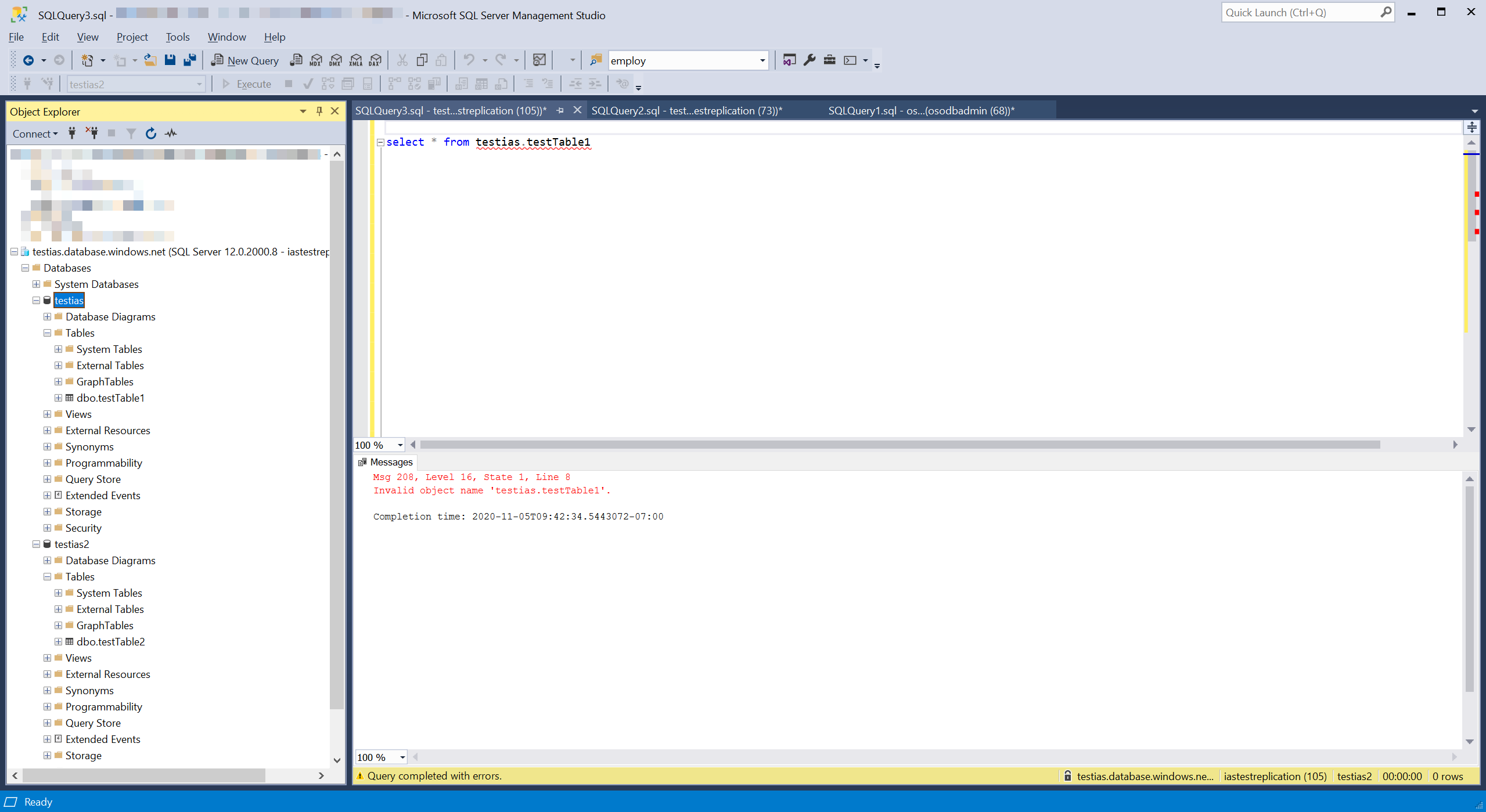
Broken query across databases

This is where the new Elastic Query comes in. I should warn at this point that the functionality is still in preview but it’s been in preview for a couple of years so I think it is pretty stable. I feel a little bit disingenuous describing it as “new” now but it is new to me. To use it is pretty easy and doesn’t even need you to use the Azure portal.

Let’s imagine that you have two databases one of which contains a collection of Products and a second database that contains a list of Orders which contain just the product id. Your mission is to query and get a list of orders and the product name. To start we can set up a couple of databases. I called mine testias and testias2 and I had them both on the same instance of SQL Azure but you don’t have to.
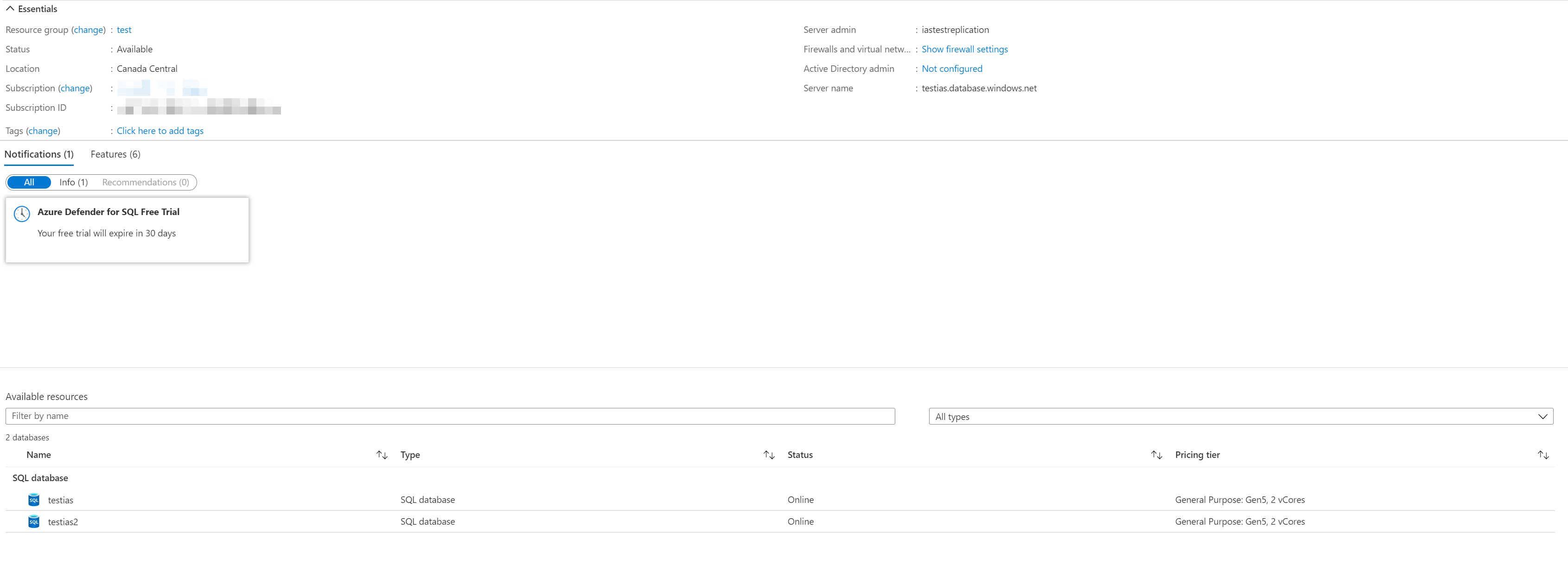
Two databases on the same server

Product Database

create table Products( 
id uniqueidentifier primary key default newid(),
name nvarchar(50));

insert into Products(name) values('socks');
insert into Products(name) values('hats');
insert into Products(name) values('gloves');

Orders Database

create table orders(id uniqueidentifier primary key default newid(),
date date);

create table orderLineItems(id uniqueidentifier primary key default newid(),
orderId uniqueidentifier,
productId uniqueidentifier,
quantity int,
foreign key (orderId) references orders(id));

declare @orderID uniqueidentifier = newid();
insert into orders(id, date)
values(@orderID, '2020-11-01');

insert into orderLineItems(orderId, productId, quantity) values(@orderID, '3829A43D-FD2A-4B7C-9A09-23DBF030C1DC', 10);
insert into orderLineItems(orderId, productId, quantity) values(@orderID, '233BC430-BA3F-4F5C-B3EA-4B82867FC040', 1);
insert into orderLineItems(orderId, productId, quantity) values(@orderID, '95A20D82-EC26-4769-8840-804B88630A01', 2);

set @orderId = newid();
insert into orders(id, date)
values(@orderID, '2020-11-02');

insert into orderLineItems(orderId, productId, quantity) values(@orderID, '3829A43D-FD2A-4B7C-9A09-23DBF030C1DC', 16);
insert into orderLineItems(orderId, productId, quantity) values(@orderID, '233BC430-BA3F-4F5C-B3EA-4B82867FC040', 99);
insert into orderLineItems(orderId, productId, quantity) values(@orderID, '95A20D82-EC26-4769-8840-804B88630A01', 0);

Now we need to hook up the databases to be able to see each other. We’re actually just going to make products visible from the orders database. It makes more sense to me to run these queries in the database which contains the most data to minimize how much data needs to cross the wire to the other database.

So first up we need to tell the Orders database about the credentials needed to access the remote database, products. To do this we need to use a SQL account on the products database. Windows accounts and integrated security doesn’t currently work for this.

create master key encryption by password = 'monkeyNose!2';
create database scoped credential ProductDatabaseCredentials 
with identity = 'ProductsDBUser', 
secret = 'wouNHk41l9fBBcqadwWiq3ert';

Next we set up an external data source for the products

create external data source ProductsSource with 
(type=RDBMS, location = 'testias.database.windows.net', 
database_name = 'testias', credential = ProductDatabaseCredentials);

Finally we create a table definition in the Orders database that matches the remote table (without any defaults or constraints).

create external table Products( id uniqueidentifier,
name nvarchar(50))
with ( data_source = ProductsSource)

We now have a products table in the external tables section in the object explorer
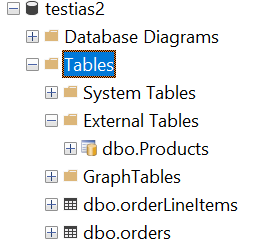
Tables from both databases

We can query the external table and even cross it against the tables in this database

select name, ol.quantity from orderLineItems ol inner join products p on ol.productId = p.id
socks   16
socks   10
gloves  1
gloves  99
hats    2
hats    0

So it is possible to run queries across databases in Azure but it takes a little set up and a little bit of thought about how to best set it up.

Possible Gotchas

  • I forgot to set up the database to be able to talk to Azure resources in the firewall so I had to go back and add that
  • Inserting to the external table isn’t supported, which is good, make the changes directly in the source database

2020-09-28

The trimStart rabbit hole

I was bragging to David about a particularly impressive piece of TypeScript code I wrote last week

if (body.trim().startsWith('<')) { //100% infallible xml detection

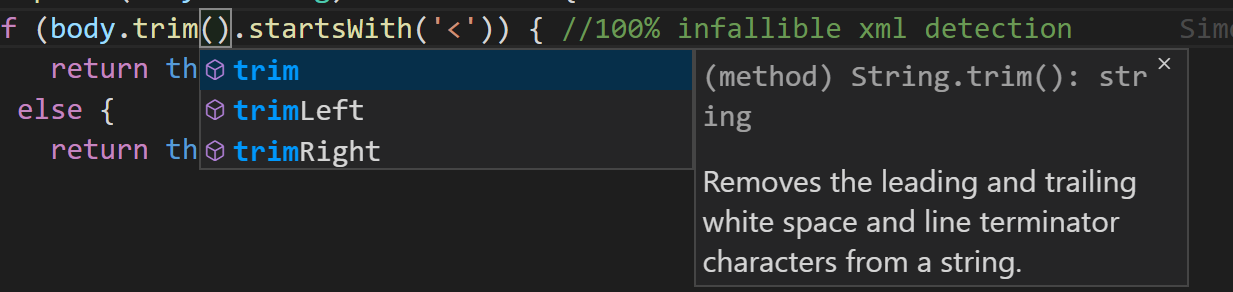
He, rightly, pointed out that trimStart would probably be more efficient. Of course it would! However when I went to make that change there was only trim, trimLeft and trimRight in my TypeScript auto-complete drop down.

TrimStart and TrimEnd are missing

Odd. This was for sure a real function because it appears in the MDN docs.

A reasonable person would have used trimLeft and moved on but it was Monday and I was full of passion for programming. So I went down the rabbit hole.

Checking out the TypeScript directory in my node_modules I found that there were quite a few definition files in there. These were the definition files that described the JavaScript language itself rather than any libraries. Included in that bunch was one called lib.es2019.string.d.ts. This file contained changes which were made to the language in es2019.

interface String {
    /** Removes the trailing white space and line terminator characters from a string. */
    trimEnd(): string;

    /** Removes the leading white space and line terminator characters from a string. */
    trimStart(): string;

    /** Removes the leading white space and line terminator characters from a string. */
    trimLeft(): string;

    /** Removes the trailing white space and line terminator characters from a string. */
    trimRight(): string;
}

So I must be targeting the wrong thing! Sure enough in my tsconfig.js I was targeting es5 on this project. When we started this was using an older version of node on lambda that didn’t have support for more recent versions of ES. I checked and the lambda was running node 12.18.3 and support for ES2020 landed in node 12.9 so I was good to move up to es2020 as a target.

Incidentally you can check the running node version in JavaScript by running

console.log('Versions: ' + JSON.stringify(process.versions));

After updating my tsconfig.js and restarting the language server all was right in the world.

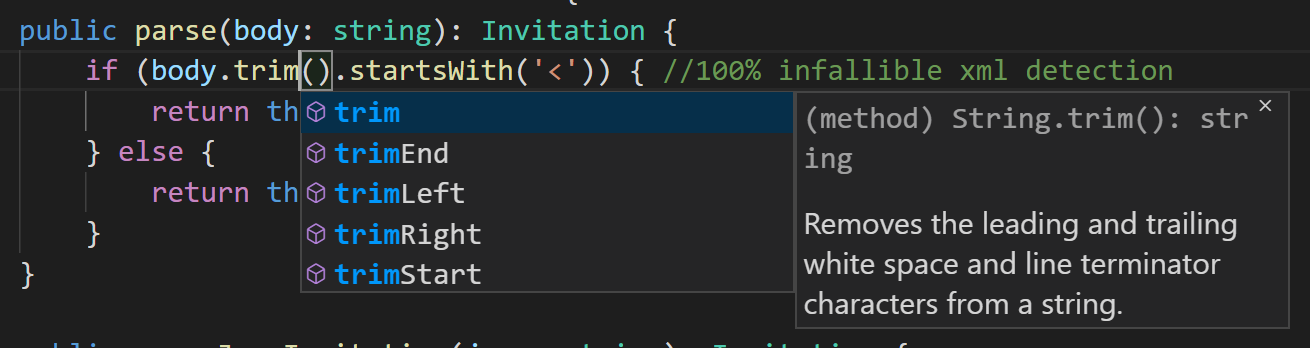
The missing functions appear

2020-07-11

Azure Functions for NServiceBus

A while back I blogged about Durable Functions vs. NServiceBus Sagas. At the time I had some good chats with Sean Feldman and one of the ideas he tossed around was the possibility of running NServiceBus on top of Azure Functions. At the time I snorted at the idea because starting up NServiceBus is kind of a heavy weight process. There is assembly scanning and DI set up to do which, in my experience, takes a good second or two. It wouldn’t be cost effective to run all that startup code on Functions. But Sean set out to prove me wrong.

Read More

2020-06-24

Running Dockerized ELK Stack on Windows

The ELK stack is a combination of 3 tools which make log ingestion and search a snap. I needed to do some debugging on a Kibana dashboard for a client so I tried to stand up a quick docker container on Windows to try out the queries. To do this I used

sudo docker pull sebp/elk
docker run -p 5601:5601 -p 9200:9200 -p 5044:5044 -it --name elk sebp/elk

During startup Elasticsearch failed to start with

ERROR: [1] bootstrap checks failed
[1]: max virtual memory areas vm.max_map_count [65530] is too low, increase to at least [262144]
ERROR: Elasticsearch did not exit normally - check the logs at /var/log/elasticsearch/elasticsearch.log

Fortunately this is really quick to fix with my WSL based docker set up. I just started WSL directly and issued

> sudo sysctl vm.max_map_count
vm.max_map_count = 65530

This found that indeed I had too few of a max_map_count. Fixing it required issuing

> sudo sysctl -w vm.max_map_count=262144

Elasticsearch and, in fact, all of ELK started up nicely after that.

2020-05-10

Azure App Configuration Expired Token

I moved one of the products I help maintain over to using Azure’s excellent App Configuration tool. But one of the other developers on the team started to have problems with it. When loading the configuration in Azure Functions they got an error: The access token has expired

Read More

2020-04-29

Rename Azure DevOps Pipeline

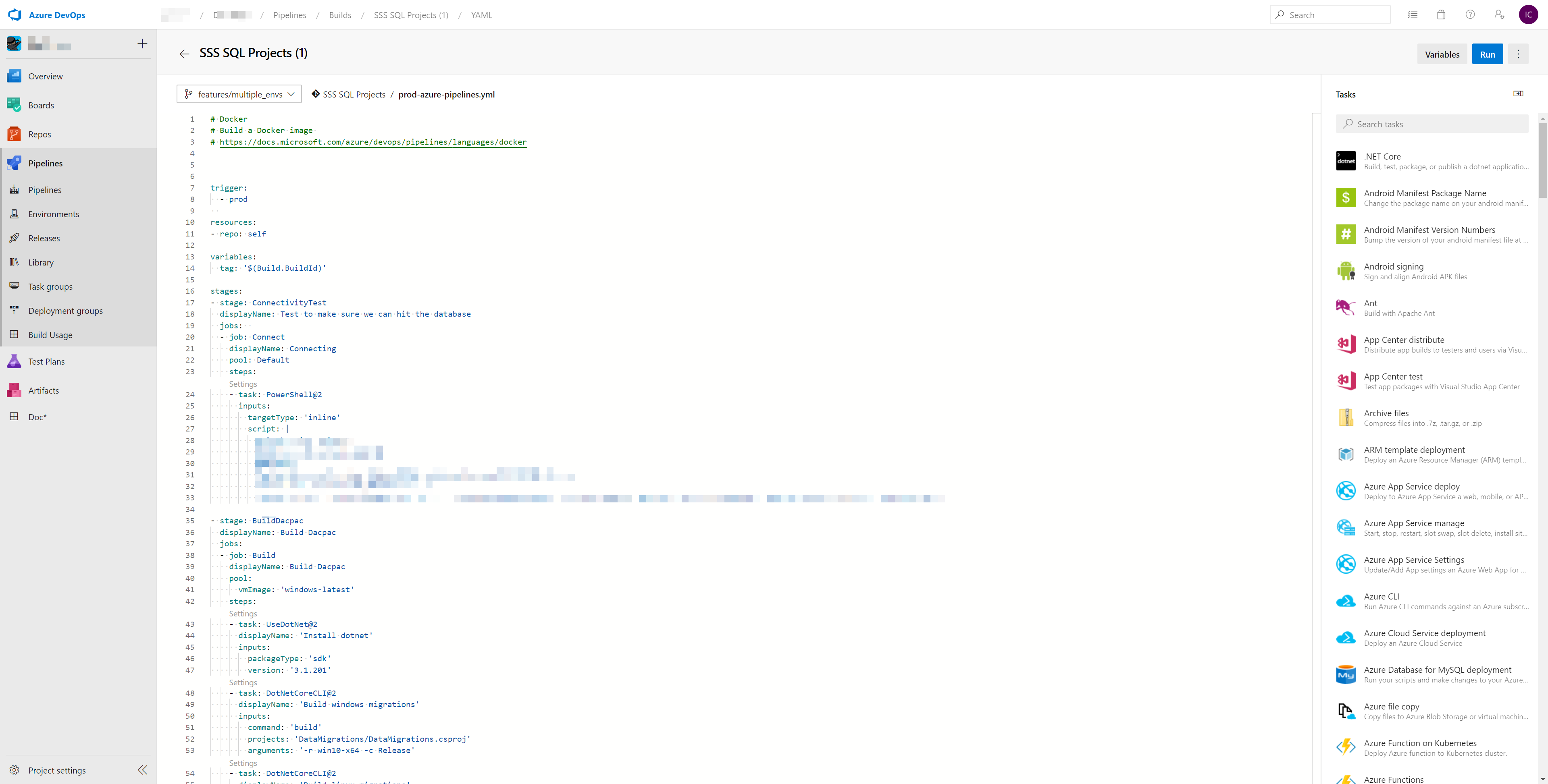
Simple things should be simple. But they aren’t always. In today’s challenge all I wanted was to rename a build definition in Azure devops. I spent ages fumbling around the edit screen for the build definition trying to find how to rename it.

No way to rename here

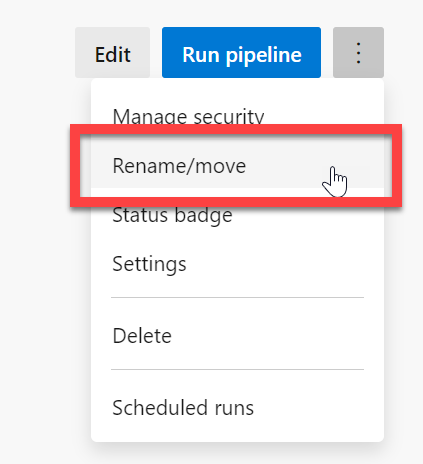
There is no way to do it from there. So I googled it and found a raft of great content on how to change the build number but nothing on how to change the build definition name. Eventually I found it. You need to go back up one level by clicking on the breadcrub from that edit screen.

Click on the project name in the breadcrumbs

Next you can rename by clicking on the ... menu

Click on the project name in the breadcrumbs

2020-04-01

Flutter unit testing with native channels

Today I was digging through some unit tests in our flutter project that seemed to be failing on my machine but not necessarily in other places like our build pipeline. The problem was that we had some calls to async methods which were not being awaited properly. I fixed those up and they uncovered a bunch of more serious problems in our tests. We were calling out to validate a phone number with libphonenumber and now we were actually awaiting the call properly we saw this error

[master ≡ +0 ~2 -0 !]> flutter test
00:03 +27 -1: test\unit\providers\create_account_provider_test.dart: Real mobile number - is valid [E]
  MissingPluginException(No implementation found for method isValidPhoneNumber on channel codeheadlabs.com/libphonenumber)
  package:blah/providers/create_account_provider.dart 101:9  CreateAccountProvider.setMobileNumber

00:03 +28 -2: test\unit\providers\create_account_provider_test.dart: Valid state if properties are valid [E]
  MissingPluginException(No implementation found for method isValidPhoneNumber on channel codeheadlabs.com/libphonenumber)
  package:blah/providers/create_account_provider.dart 101:9  CreateAccountProvider.setMobileNumber

As it turns out libphonenumber is actually a native implementation wrapped up with flutter. To communicate with this native code isn’t possible in a test environment so it needs to be mocked. This can be done by mocking the channel.

In the setUp() for the unit tests I added a call to setMockMethodCallHandler like so

const _channel = const MethodChannel('codeheadlabs.com/libphonenumber');
setUp(() async {
_channel.setMockMethodCallHandler((MethodCall methodCall) async {
    return true;
    });  
});

tearDown((){
_channel.setMockMethodCallHandler(null);
});

With this call in place I was able to run the test without issue.

2020-03-31

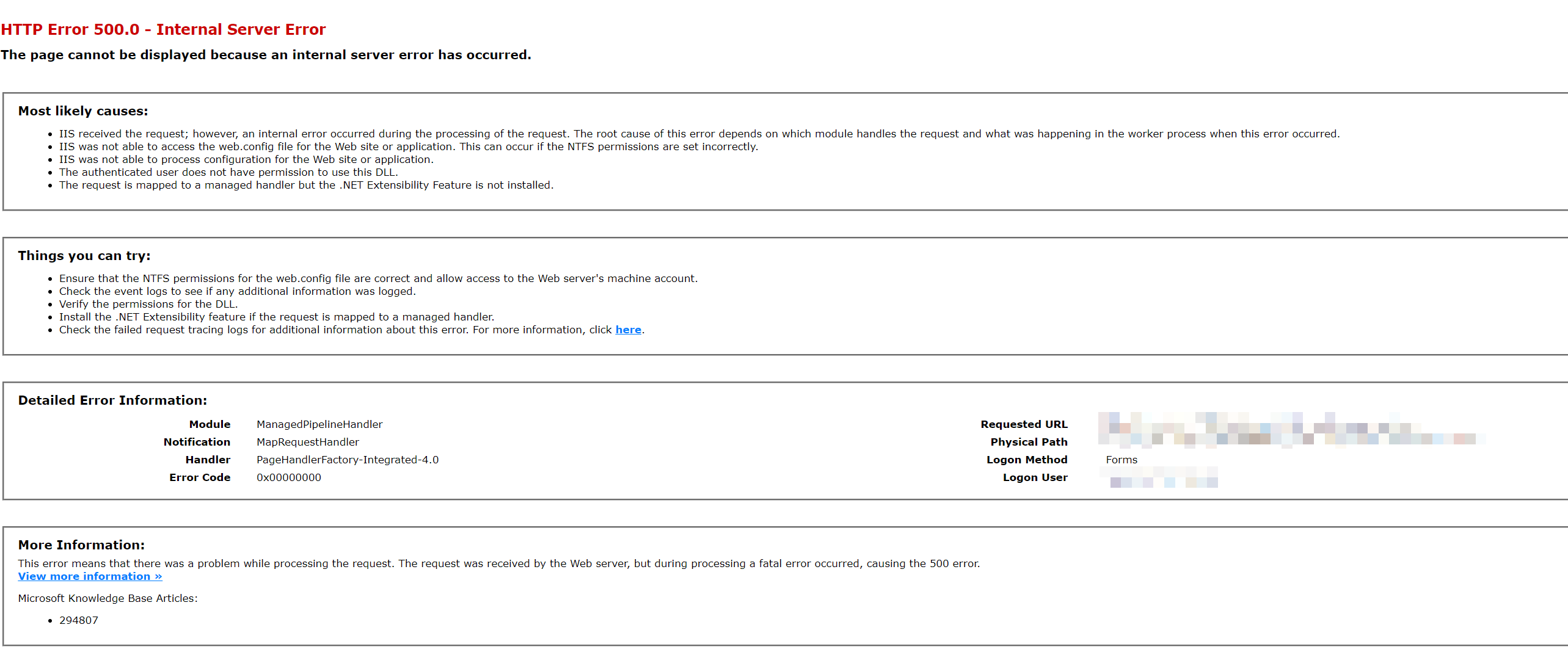
Solve WebForms Errors with PreCompilation

I have a webforms application that I help maintain. Today I made some change and managed to break one of the pages on the site. The error was unbelievably unhelpful.

Wut? 500 error with no useful details

In older versions of ASP.NET it is nearly impossible to diagnose these sorts of errors. Was it something with the web.config? Did I mess up the dependency injection? I messed about a bit and found that if I deleted everything out of the .aspx file things worked. So it was the view. But what?

Read More

2020-01-15

Flutter Widget Testing

I’m sure I don’t have to tell you how important automated tests are to the software development process. Even if they didn’t have other advantages I’d write tests just so I could have that sense of security when changing things in an application. Most every framework and language has some sort of testing ability built into it and Flutter is no different. However the documentation for widget testing in flutter is pretty poor. This post should get you over some of the gotchas I faced.

Read More

2020-01-10

Allow hosted agents through firewall

I have an on-premise (well in a third party data center but close enough) database which I’d like to update via a build in a hosted agent on Azure. We’ve done this before in Jenkins by just allowing a specific IP address through the firewall. However we’re in the process of moving to DevOps for this build. Unfortunately, the hosted build agents don’t have entirely predictable IP addresses. Every week Microsoft publishes a list of all the IP addresses in Azure. It is a huge json document and for our region (Central Canada) there are about 40 IP addresses ranges the build agent could be in. We want an automated way to update our firewall rules based on this list.

To do so we make use of the Azure Powershell extensions. The commandlet Get-AzNetworkServiceTag is an API based way to get the IP ranges. You can then pass that directly into the firewall rules like so

$addrs = ((Get-AzNetworkServiceTag -Location canadacentral).Values|Where-Object { $_.Name -eq "AzureCloud.canadacentral" }).Properties.AddressPrefixes
Set-NetFirewallRule -DisplayName "Allow SQL 1433 Inbound" -RemoteAddress $addrs

Running this once a week lets us keep the firewall up to date with the hosted agent ranges.